Fehlermeldung:
Unfortunately the MapInfo Pro Bing Services Update was ... .
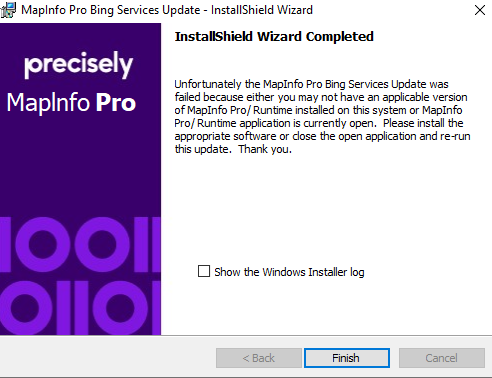
Mögliche Ursache:
This error may be caused by the presence of an incorrect MapInfo Pro serial number on the computer's registry at one of the following locations below:
Computer\HKEY_CURRENT_USER\Software\MapInfo\MapInfo\Professional\2300
Computer\HKEY_LOCAL_MACHINE\SOFTWARE\MapInfo\MapInfo\Professional\2300
For example, there may be a evaluation version serial number left behind from a previous installation.
Lösung:
If unsure about access or permissions to modify the Windows Registry, it is highly recommended to ask the IT administrator for assistance with the following steps.
1. Make sure MapInfo Pro is closed.
2. Open the Registry Editor in Windows and verify whether an incorrect serial number and access code exists by checking the 'ProductId' and 'AccessCode' entries at the following locations:
Computer\HKEY_CURRENT_USER\Software\MapInfo\MapInfo\Professional\2300
Computer\HKEY_LOCAL_MACHINE\SOFTWARE\MapInfo\MapInfo\Professional\2300
If an invalid ProductID and AccessCode exists (such as an evaluation version serial number which starts with 'MIEWEU......' or an access code of '000000'), the values should be updated with the correct serial number and access codes.
Once the correct values have been updated, run the Bing Services installer again by right-clicking it and selecting 'Run as administrator' to verify that the installation is successful. MapInfo Pro should not be running when the patch is applied.
siehe auch:
"Unfortunately the MapInfo Pro Bing Services Update was unable to locate a valid version of Mipro or Runtime to upgrade" message when installing the MapInfo Pro Bing Services update patch
(This article explains the cause of the error message and a possible resolution.)
URL's used for Bing Imagery within MapInfo Pro
(This article explains how to find the URL's used for Bing Imagery within MapInfo Pro.)
Here are the URL's used if a company's IT Dept. needs to "white list" them, due to Proxy or Firewall issues:
Verifying functionality for Bing Maps within MapInfo Pro
(This article explains how to verify that Bing Maps within MapInfo Pro is functioning correctly.)